Pace Time runs on Apple Watch so you can handle pace math, finish-time checks, and quick conversions from your wrist. It is built for the moments when you need an answer immediately, like race morning, between workout reps, or while talking through splits with an athlete.
Why use a running calculator on Apple Watch
The value of the watch app is speed and convenience. Sometimes you do not want to unlock your phone just to answer a simple question like What pace do I need for a 22-minute 5K? or What does 1:32:00 work out to for the half marathon? The Apple Watch app keeps those calculations close at hand.
For coaches, it is a practical way to check math while standing beside the track. For runners, it is useful during warmups, at the corral, or during recovery between intervals when attention needs to stay on the session.
Instructions
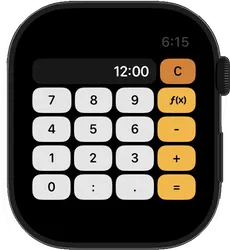
The main Apple Watch calculator screen keeps the number pad visible for quick pace and time entry. To open the extra functions, tap the f(x) key on the right side of the screen.
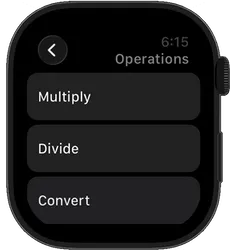
That button takes you to the Operations screen, where you can choose Multiply, Divide, or Convert. Use it any time you need more than basic add and subtract pace math.
This makes the watch app easier to use on a small screen: the everyday keys stay in front, and the less common functions are one tap away.
Main calculator screen with the f(x) key visible on the right.The Operations screen that opens after tapping f(x).
Designed for quick wrist-based calculations
The Apple Watch version of Pace Time is not trying to replicate every part of a phone app. It focuses on the core calculator tasks and presents them with controls that are easier to use on a small screen.
Large, explicit controls that are practical on Apple Watch
Fast entry for hours, minutes, and seconds
Useful for pace, finish-time, split, and conversion math
Simple enough to use while moving between reps or stations
Examples of when the watch app helps
Before a race: Divide your goal time by distance to confirm target pace one more time.
During workouts: Check whether a projected split still matches the session goal after a rep runs fast or slow.
With athletes: Answer pacing questions immediately without passing a phone back and forth.
For triathlon math: Add transition estimates or compare segment times when you need a quick answer.
Common running math you can do on Apple Watch
Pace Time gives you the same practical calculator logic on the watch that makes the phone app useful:
Goal pace from finish time - Enter a target time and divide by distance.
Projected finish from pace - Multiply target pace by race distance.
Split adjustments - Add or subtract time to see how a pacing change affects the full result.
Time conversions - Convert between time-style values and decimal formats when workout math gets messy.
Part of the full Pace Time app
The Apple Watch app is included with Pace Time on iPhone. Use the phone when you want a larger screen, and use the watch when you want immediate access on your wrist. That combination works well for runners who plan on the phone but want quick checks during training or race-day prep.
If you also use Android, Pace Time is available there too, but the watch experience is specific to Apple Watch with the iPhone version.
Apple Watch App FAQ
Quick answers for runners and coaches comparing the watch experience with the phone app.
Does Pace Time have an Apple Watch app?
Yes. Pace Time includes an Apple Watch app so you can do pace, time, and split calculations from your wrist without reaching for your phone.
What can I calculate on Apple Watch?
You can work through running pace math, finish-time projections, split checks, and time conversions using a watch-friendly calculator layout with large, direct controls.
Do I need the iPhone app too?
Yes. The Apple Watch app comes with the iPhone version of Pace Time, and the watch experience works as a companion for runners and coaches who want quick calculations on the go.
Is the Apple Watch app useful during a race?
Yes. It is useful for last-minute pacing checks at the start line, during warmups, or between workout reps when taking out a phone would slow you down.
Related Running Guides
Use these guides when you want examples for the kinds of pace math you can check from your wrist.